Serafim S3 Cloud Gaming Controller Unboxing! Plug and Play Turns into a Handheld Device for Mobile Gamers
mobile, serafim s3
I’ve wanted to add a controller for my phone for a long time, but I don’t consider myself a heavy gamer, so I don’t want to buy something too complicated. Ideally, it should be a plug-and-play, brainless device that doesn’t require any setup. After searching online, I found that many people recommend the Serafim S3. Although it has been on the market for over a year, the new version supports both iPhone and Android platforms, and with recent game promotions, I’m sharing an unprofessional unboxing article!
Why choose the Serafim S3? As mentioned earlier, this cloud gaming controller is really easy to use. It not only combines rich features and supports cross-platform, but the best part is its simplicity. Even if you’re not a heavy gamer, you can intuitively get the hang of it. It’s the best tool to instantly turn your phone into a handheld console, providing an immersive experience.

▲ First, let’s take a look at the packaging. The box cover clearly shows the Serafim S3 cloud gaming controller, showcasing a strong gaming atmosphere. In the upper left corner, you can see the honor certificate for winning the 2024 CES award, supporting both iPhone and Android platforms, with a special emphasis on Apple MFi certification to ensure a more stable connection. The black paper box inside has a great texture, and opening it reveals the actual Serafim S3 cloud gaming controller.

▲ In addition to the Serafim S3 cloud gaming controller itself, the lower layer of the plastic box also contains a manual, replaceable grips, and other accessories, all laid out for reference.

▲ The Serafim S3 cloud gaming controller offers two types of shells: thick and thin. The thick shell has a surface treated with anti-slip particles, and the overall area is slightly larger, while the thin shell has a relatively smooth surface. Which one is better depends on personal preference and habits.

▲ The secret to the Serafim S3’s usability lies in the central retractable support design between the left and right handles.


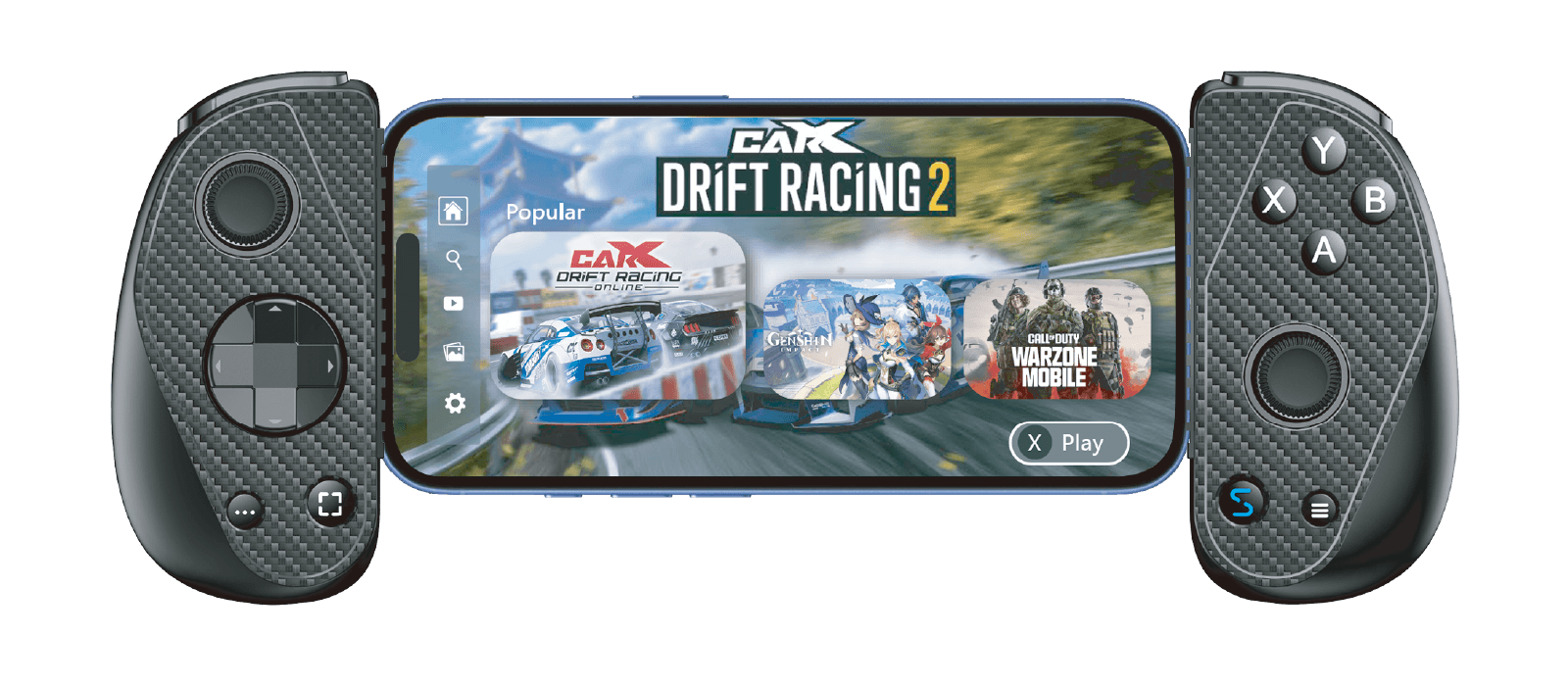
▲ Although gaming controllers emphasize practicality, the Serafim S3 does not compromise on quality. The surface of the handle features a delicate carbon fiber texture. The button layout includes left and right analog sticks, a D-pad, ABXY buttons, RL buttons, and more, with a special emphasis on the Hall effect joystick and trigger buttons, which are not only durable but also reduce drift issues. Additionally, to enhance the mobile gaming experience, dedicated buttons for recording and screenshots have been added, and the app integrates editing and sharing functions.


▲ Next, let’s attach the phone (using the iPhone 15 Pro as an example). First, align the phone’s bottom USB-C port for insertion, then pull open the central retractable support, place it in, and clamp it tight. For detailed compatible models, refer to the Serafim official website.


▲ This is roughly what it looks like when assembled. The overall weight is quite light, and holding it in hand doesn’t feel burdensome. The retractable support at the back does not obstruct the phone’s camera, and the attention to detail is full of thoughtfulness.


▲ No matter how powerful the gaming controller is, it is useless without rich game support, which is the biggest advantage of the Serafim S3! Scan the QR code inside the box to download the “Serafim Console” app, and once opened, you can see a collection of games from major platforms like Apple Store, Google Play, Steam, Xbox, PlayStation, etc., neatly categorized by game type, so players don’t have to search for a long time and can quickly launch the games they want to play. The “Serafim Console” app is simply the soul of the Serafim S3!

▲ The Serafim Console supports well-known games like Apex Legends, Minecraft, NBA 2K Mobile, Fortnite, Genshin Impact, Forza Horizon, etc., and corresponds to various mainstream gaming platforms. Even if you want to play games from platforms like PS Remote Play, Steam Link, GeForce NOW, it’s no problem. As long as you log in with an account, you can play PS 5 or Steam games directly on your phone, which is really convenient!


▲ Finally, I want to share my experience. I actually used the Serafim S3 to play two very different games, “Sky: Children of the Light” and “Crash Drive 3”. The former involves flying or running in a vast world, and the joystick control is super smooth and fluid, paired with majestic music, creating a strong sense of immersion. The latter is a high-freedom racing game, and with the Serafim S3, actions like accelerating, turning, and crashing are all precise, and the feel is completely on par with home console controllers.

▲ It’s worth mentioning that the Serafim S3 particularly emphasizes the “play while charging” feature. After all, the biggest fear when gaming is running out of battery. At this time, just connect a power bank to the bottom USB-C port, and you can play while charging without having to remove the controller or pause.
In summary, the biggest advantage of the Serafim S3 is its “plug and play” feature. With just a simple action, it instantly upgrades your phone to a handheld console, paired with the “Serafim Console” providing a one-stop solution. As long as the games are in the app, you can directly start playing through the Serafim S3, and players don’t need to spend time searching or dealing with complicated settings, easily satisfying a variety of gaming experiences!